Gigabyte M27U (27" 4K 160Hz)
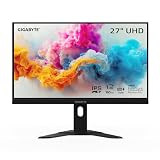
An enthusiast-tier 27-inch 4K IPS panel that pushes to 160Hz with a built-in KVM, landing at a solid 69. It suits players who want sharp 4K and high refresh in one IPS screen and like the convenience of switching devices off the monitor itself. Skip it if you're chasing OLED-level contrast, or if your GPU can't feed 4K at 160Hz.
Scores
BreakdownHideOverall69±6Caliber-forward blend — tier caliber + within-tier price rank 30%, value 25%, confidence 20%, compatibility 15%, upgrade path 10% — renormalized over applicable dimensions; excluded here: compatibility (no ecosystem dimension).
Scores
BreakdownHideCaliber-forward blend — tier caliber + within-tier price rank 30%, value 25%, confidence 20%, compatibility 15%, upgrade path 10% — renormalized over applicable dimensions; excluded here: compatibility (no ecosystem dimension).
The ± band on the overall score reflects sourcing confidence — wider when fewer specs are verified.
How each score is computed: our scoring methodology.
Specifications
| Spec | Value | Verification |
|---|---|---|
| size (in) | 27Sourced | Sourced |
| resolution | 3840x2160Sourced | Sourced |
| refresh (Hz) | 160Sourced | Sourced |
| panel | IPSSourced | Sourced |
4/4 detail specs sourced. Amber rows are flagged for verification — we show them as reported, not confirmed.
Verdict
Best for
- 4K high-refresh IPS value with built-in KVM (street price swings — check current)
Who should skip this
- OLED contrast expectations; budget GPUs (4K160 needs muscle)
Where to buy
List price $430
Prices are a guide and can change — confirm the current price on the retailer's site before buying.
Prices last checked Jun 14, 2026 — retailer prices change often, so click through for the current price.
Some links may be affiliate links — we may earn a commission at no extra cost to you; rankings are never influenced by it.
Compatibility
No platform-specific compatibility requirements — this works in any standard pc builds setup.
Upgrade path
Buying today, the ASUS TUF Gaming VG27AQ3A (27" 1440p 180Hz Fast IPS) scores higher for less — the smarter pick in monitors unless you specifically want this one. See it →