MSI MAG 321UPX QD-OLED (32" 4K QD-OLED 240Hz)
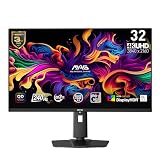
The MAG 321UPX is an enthusiast 31.5-inch 4K QD-OLED at 240Hz with a flat panel, HDMI 2.1 and OLED Care 2.0, positioned as the value entry into large-format 4K QD-OLED. It's a good pick for those wanting big-screen 4K OLED for gaming and media. The limitations are connectivity-side: there's no DisplayPort 2.1, and USB-C power delivery tops out at just 15W, so it won't drive a laptop.
Scores
BreakdownHideOverall75±6Caliber-forward blend — tier caliber + within-tier price rank 30%, value 25%, confidence 20%, compatibility 15%, upgrade path 10% — renormalized over applicable dimensions; excluded here: compatibility (no ecosystem dimension).
Scores
BreakdownHideCaliber-forward blend — tier caliber + within-tier price rank 30%, value 25%, confidence 20%, compatibility 15%, upgrade path 10% — renormalized over applicable dimensions; excluded here: compatibility (no ecosystem dimension).
The ± band on the overall score reflects sourcing confidence — wider when fewer specs are verified.
How each score is computed: our scoring methodology.
Specifications
| Spec | Value | Verification |
|---|---|---|
| size (in) | 31.5Sourced | Sourced |
| resolution | 3840x2160Sourced | Sourced |
| refresh (Hz) | 240Sourced | Sourced |
| panel | QD-OLEDSourced | Sourced |
4/4 detail specs sourced. Amber rows are flagged for verification — we show them as reported, not confirmed.
Verdict
Best for
- The value 32" 4K QD-OLED — flat panel, HDMI 2.1, OLED Care 2.0
Who should skip this
- Those needing DisplayPort 2.1; USB-C power delivery (only 15W here)
Known limitations
- QD-OLED burn-in care needed; 15W USB-C is low for laptop charging
Where to buy
List price $899
Prices are a guide and can change — confirm the current price on the retailer's site before buying.
Prices last checked Jul 1, 2026 — retailer prices change often, so click through for the current price.
Some links may be affiliate links — we may earn a commission at no extra cost to you; rankings are never influenced by it.
Compatibility
No platform-specific compatibility requirements — this works in any standard pc builds setup.
Upgrade path
A top-tier monitor — there's little to upgrade to within the category.