Crucial Pro OC 64GB DDR5-6000 vs G.Skill Trident Z5 RGB 32GB DDR5-7200
This is the cleanest "speed versus capacity" fork in DDR5 right now, and the good news is the two kits barely overlap. The G.Skill Trident Z5 RGB is a 32GB (2x16) DDR5-7200 CL34 kit built to win Intel benchmarks; the Crucial Pro Overclocking is a 64GB (2x32) DDR5-6000 CL40 kit built to keep a workstation from ever touching the page file. Same generation, same two-DIMM layout, almost opposite priorities. Decide what your machine spends most of its day doing and the choice mostly makes itself.
Pick the G.Skill Trident Z5 RGB 32GB if you're on a high-end Intel platform and chasing frames. By the spec sheet it runs DDR5-7200 with CL34-45-45-115 timings at 1.40V on an Intel XMP 3.0 profile, which is the canonical fast-RAM config for Z790 and Z890 boards. On those platforms 7200 with tight subtimings is where you actually see the gains in CPU-bound, high-refresh gaming and in latency-sensitive work. The catch is that this is an Intel-tuned kit: it ships XMP 3.0 only, with no AMD EXPO profile, and Ryzen memory controllers rarely run 7200 in a clean 1:1 mode, so on AM5 you'd typically end up dialing it back to 6000-6400 anyway and paying a premium for headroom you can't use.
Pick the Crucial Pro Overclocking 64GB if your bottleneck is RAM running out, not RAM running slow. This is a 64GB (2x32) kit at DDR5-6000 CL40, 1.35V, built on Crucial's own Micron silicon, and critically it carries both XMP 3.0 and AMD EXPO profiles, so it boots to rated speed on Intel and Ryzen alike. It has been listing as the cheapest in-stock 64GB DDR5 kit at Newegg when checked, with the white-heatspreader variant undercutting the black one by a meaningful margin. Sixty-four gigs is the line where heavy Lightroom and Premiere timelines, large Blender scenes, local AI models, and a stack of VMs stop swapping. CL40 is looser than the 6000 CL30 enthusiast kits, but at the capacity tier that latency gap is noise next to never hitting the disk.
The trap to avoid: buying on the headline DDR5-7200 number for a build where the work is memory-hungry rather than memory-fast. If you do creative or AI work and you choose the 7200 kit, you get a beautifully fast 32GB that fills up and starts paging the moment a real project loads, and paging to an SSD is orders of magnitude slower than any DDR5 latency difference you were optimizing for. The inverse trap is real too: dropping 64GB CL40 into a pure 1440p/4K gaming rig that never uses more than 20-24GB means you paid for capacity that sits idle while a 32GB high-speed kit would have fed your CPU better.
If you're PC-gaming-first on an Intel Z-series board, 32GB is still plenty of room and the Trident Z5 RGB's 7200 CL34 is the kit that turns that platform's memory headroom into actual performance. If you're on AM5, or you edit photo and video, render, run local models, or juggle VMs, the Crucial Pro OC 64GB is the safer money: dual XMP/EXPO support means it just works on either platform, and double the capacity removes the one wall that actually stalls those workflows. Capacity is the upgrade you feel; raw frequency is the upgrade you benchmark. Both are "pro"-tier kits, so this isn't a quality call, it's a workload call. Buy the 7200 if your problem is speed, buy the 64GB if your problem is space, and when in doubt about a mixed-use machine, the headroom of 64GB ages better than the megahertz of 32GB.
Spec comparison (generated live)
| Spec | 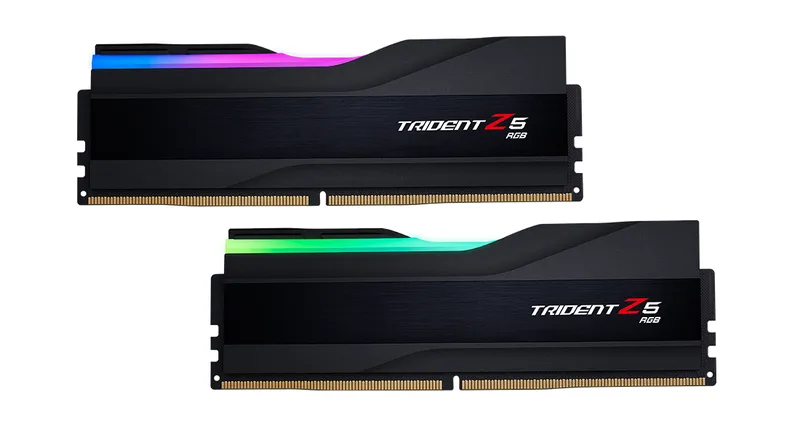 G.Skill Trident Z5 RGB 32GB (2x16) DDR5-7200 CL34 G.Skill Trident Z5 RGB 32GB (2x16) DDR5-7200 CL34G.Skill |  Crucial Pro Overclocking 64GB (2x32) DDR5-6000 CL40 Crucial Pro Overclocking 64GB (2x32) DDR5-6000 CL40Crucial |
|---|---|---|
| Price (tracked / list) | $693 | $736 |
| Overall scoreeffectively tied (within ±3pt band) | 78±3 | 78±3 |
| Tier | pro | pro |
| generation | DDR5 | DDR5 |
| capacity (GB) | 32 | 64 |
| speed mt | 7200 | 6000 |
| modules | 2 | 2 |
| Where to buy | Check price | Check price |
Some links may be affiliate links — same price for you; our comparisons are never influenced by commissions.